Security software · buyer’s guide
Norton AntiVirus Plus reviewed: what the tier includes, what it leaves out
How to read this page. It is editorial content funded by advertising. Every button marked partner link goes to the vendor through an affiliate programme, and Black Shark s.r.o. may receive a commission if you subscribe. That costs you nothing extra and does not change your price. We are paid for referrals, not for a positive verdict — see the editorial policy for what that does and does not buy.
Independence. This site is not affiliated with, endorsed by or sponsored by Gen Digital Inc., the owner of the Norton brand. Where anything here differs from the vendor’s own product page, licence terms or price list, the vendor’s information prevails.
No tracking. This site sets no cookies, loads nothing from third parties and runs no analytics. Nothing is stored in your browser. You can verify that yourself — the cookie policy explains how.
Antivirus marketing tends to sell a feeling rather than a mechanism. This page does the opposite: it explains what the detection engine in a modern suite actually does, sets out which features belong to the Norton AntiVirus Plus tier and which are reserved for the Norton 360 tiers above it, and lists the contract details worth checking before you hand over a card number. All diagrams on this page are original drawings made for this article.
What Norton AntiVirus Plus is
Norton AntiVirus Plus is the entry level of Norton’s consumer security range. Norton is a brand of Gen Digital Inc., the company formed from the merger of NortonLifeLock and Avast. The product is sold as a subscription rather than a one-off licence: you pay for a term, usually a year, and protection and definition updates continue while the subscription is active.
The tier is deliberately narrow. It is the malware-protection part of Norton’s range without the identity and privacy extras. If you have seen advertising for a Norton VPN, for dark web monitoring or for parental controls, those belong to the Norton 360 products, not to this one. That distinction is the single most common source of disappointment with this tier, so it is worth being blunt about it early.
What this page will not do
It will not quote a price, because prices differ by country, change with promotions and are set by the vendor. It will not print a star rating, because a number invented on a page like this one is worth nothing. And it will not tell you the product blocks every threat — nothing does.
See the current Norton AntiVirus Plus listing
Open the vendor’s pagePartner linkPartner link. If you buy after following it, Black Shark s.r.o. may receive a commission from the vendor. You pay no more than you would going direct, and nothing is added to your price.
How antivirus detection actually works
Almost every security product on the market, paid or free, decides whether a file is dangerous using three complementary approaches. Understanding them makes marketing copy much easier to read.
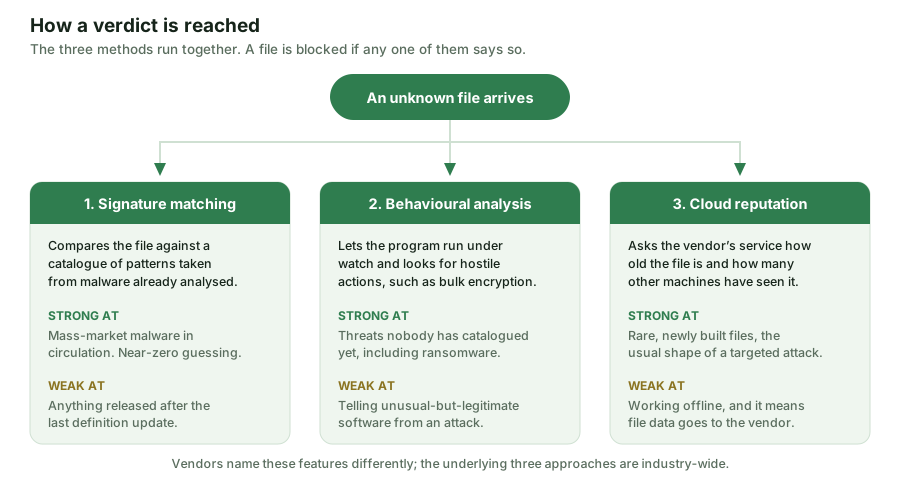
Signature matching is the oldest method. The vendor analyses a malware sample, extracts a distinguishing pattern, and distributes it to installed clients as a definition update. It is fast, cheap and produces very few false alarms. Its weakness is structural: a signature can only describe something that has already been seen and analysed.
Behavioural analysis closes part of that gap. Instead of asking what a file looks like, it asks what the program does once it is running: is it enumerating and encrypting documents in bulk, injecting itself into other processes, logging keystrokes, or trying to disable the security software? Norton’s documentation calls its behavioural component SONAR, and pairs it with an intrusion-prevention layer that inspects network traffic. Other vendors use different names for the same idea. The trade-off is judgement: a system that reasons about intent will occasionally misjudge unusual but legitimate software.
Reputation and cloud lookup adds context. When an unknown executable appears, the client asks the vendor’s service how old the file is and how widely it has been seen. A binary that appeared an hour ago on a handful of machines is treated with far more suspicion than one installed by millions of people for years. This is effective against targeted attacks, but it means metadata about files on your machine is sent to the vendor — something worth reading the vendor’s own privacy documentation about, since it is a genuine privacy trade-off rather than a hidden scandal.
Why one layer is never enough
Because each of those methods fails in a different way, security products stack them. The industry term is defence in depth: an attack has to defeat every layer in sequence, and the layers are chosen so that a weakness in one is covered by another.
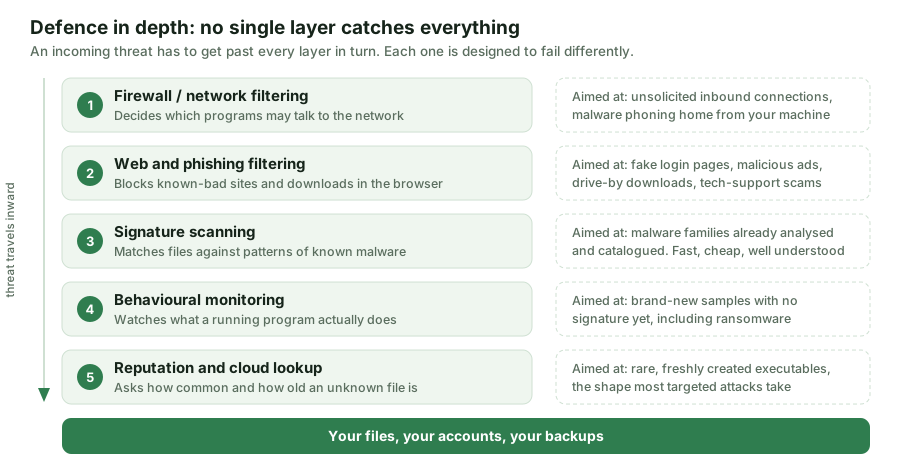
The practical consequence for a buyer is that feature checklists are less informative than they look. Two products can both claim “real-time protection” and differ sharply in how aggressively the behavioural layer intervenes, how quickly definitions ship, and what happens after something gets through. That last point is the one marketing rarely addresses: recovery matters as much as prevention, which is why the backup habit discussed further down is not a throwaway suggestion.
Check the tier, the price and the terms at the source
Go to Norton AntiVirus PlusPartner linkPartner link. If you buy after following it, Black Shark s.r.o. may receive a commission from the vendor. You pay no more than you would going direct, and nothing is added to your price.
What this tier includes — and what it does not
The following reflects the way Norton itself groups features across its consumer tiers at the time of writing. Allowances and device counts are the parts most likely to have changed by the time you read this, so treat the grid as a map of the shape of the range rather than as a specification sheet.
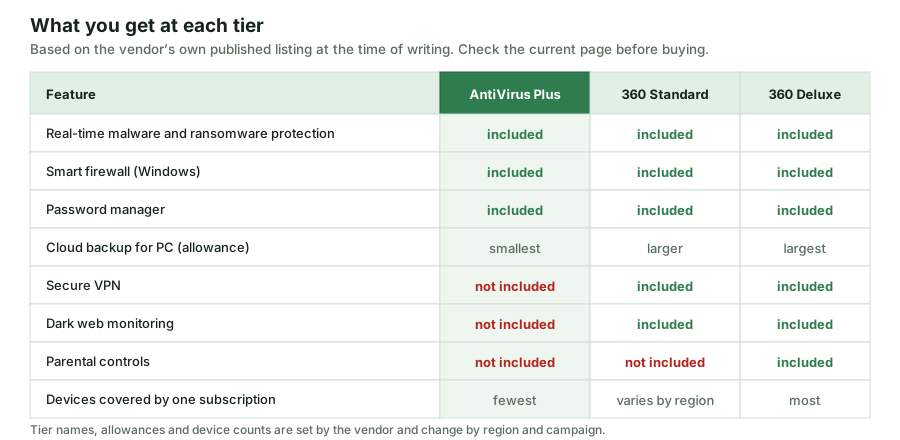
| Feature | AntiVirus Plus | Norton 360 tiers |
|---|---|---|
| Real-time malware and ransomware protection | Included | Included |
| Smart firewall (Windows) | Included | Included |
| Password manager | Included | Included |
| Cloud backup for PC | Included, smallest allowance | Larger allowance by tier |
| Secure VPN | Not in this tier | Included |
| Dark web monitoring | Not in this tier | From 360 Standard upwards |
| Parental controls | Not in this tier | From 360 Deluxe upwards |
| Devices per subscription | Fewest | More, by tier and region |
Two honest caveats about the included extras
The password manager is not exclusive. Norton offers a password manager free of charge as a standalone product. Its presence in a paid tier is convenience, not a reason on its own to pay.
The cloud backup is Windows-only and small. It is a useful place for documents that would hurt to lose, not a substitute for a real backup strategy. The allowance at this tier is the smallest in the range.
What independent test labs can tell you
The only evidence about detection quality that is worth anything comes from laboratories that test products against the same threat set under documented conditions. The three most cited in Europe are AV-TEST in Germany, AV-Comparatives in Austria, and SE Labs in the United Kingdom. All three publish their methodology and their results openly.
Norton’s consumer products are regular participants in these public rounds and have generally placed well on protection. We are deliberately not printing a score here, for two reasons. First, results are produced per round: a figure from one test month says little about the next. Second, a percentage quoted second-hand on an advertising-funded page is exactly the kind of claim a reader has no way to check. If detection rates matter to your decision, open the current report at one of the three labs above and read the round yourself — it takes about five minutes.
Two things to keep in mind when you do. Protection scores at the top of the market are clustered very tightly, so the gap between first and fifth place is often a fraction of a percent and may reverse next round. And a high false-positive count matters as much as a high detection rate: software that blocks your own files trains you to click “allow”, which is worse than no software at all.
Performance: what “light on resources” means
“Light on your system” is a claim every vendor makes and very few define. In practice, impact shows up in three places: the time a full scan takes, the slowdown while it runs, and the effect on everyday actions such as launching an application, copying files or loading a web page. AV-TEST and AV-Comparatives both measure the third category with repeatable tests, and their performance reports are the place to look.
Norton documents scheduled and idle-time scanning — the product looks for moments when the machine is not being used to do heavy work. That design reduces the chance you notice a scan, but it is not magic: on an older machine with a mechanical hard disk, a full scan is still noticeable. We have not run our own benchmark of this product, and we will not claim a slowdown figure we did not measure.
Compare the tiers on the vendor’s own page
View Norton AntiVirus PlusPartner linkPartner link. If you buy after following it, Black Shark s.r.o. may receive a commission from the vendor. You pay no more than you would going direct, and nothing is added to your price.
Do you still need paid antivirus?
This is the question a page like this one has a commercial incentive to answer badly, so here is the straight version. Windows has included Microsoft Defender Antivirus, switched on by default, for years, and it is a competent product that appears in the same independent test rounds as the paid suites. For a cautious user who installs updates, uses unique passwords and does not download software from unofficial sources, Defender plus good habits is a defensible position.
The arguments for paying are narrower and more specific than the advertising suggests:
- You want one console covering several devices, or several people, rather than per-machine defaults.
- You want a support line with a human on it when something goes wrong.
- You want the bundled extras — and here it matters which tier: at AntiVirus Plus the extras are the firewall, the password manager and the small backup allowance, not the VPN or identity monitoring.
- You are protecting a Mac, where the built-in protections are real but less visible, and a single dashboard has some value.
The arguments against are equally real: a second security product duplicates what the operating system already does, subscriptions renew, and no suite protects against giving your password to a convincing fake login page. If, after reading that, the tier still fits, the partner link below goes to the vendor’s own page.
The path a downloaded file takes
It helps to see the sequence. Below is a simplified version of what happens between clicking a download link and being allowed to open the result.
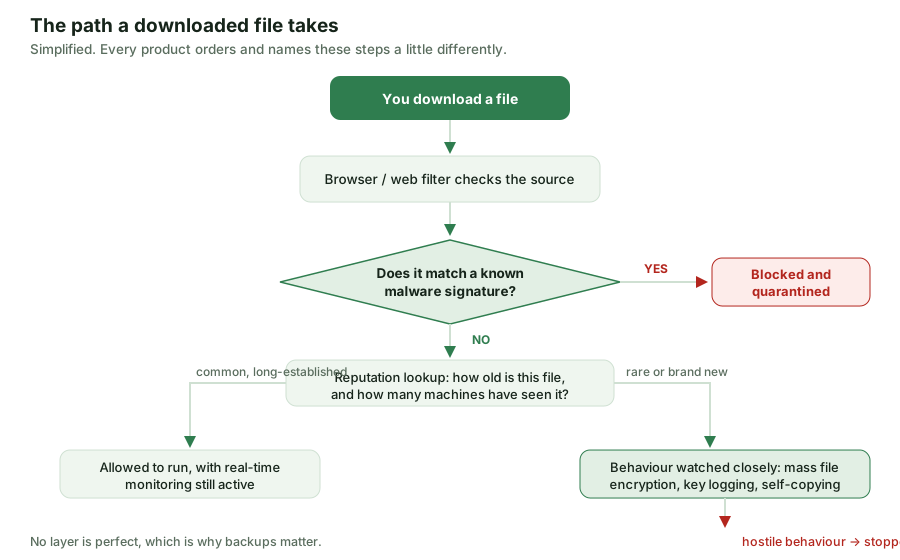
The branch on the right is the interesting one. A rare, freshly compiled executable is not declared malicious on that basis — plenty of legitimate software is rare and new — but it is watched much more closely while it runs, and a suspicious action ends the process. Where the product supports rollback, changes the program made can be reversed. Rollback is a best-effort mechanism, not a guarantee, which is the final argument for keeping a backup somewhere the running machine cannot write to.
Phishing: the gap software cannot close
A large share of real-world account compromise involves no malware at all. The attacker sends a convincing message, you type your password into a page that looks right, and the software has nothing to detect: no hostile file was ever executed. Web filtering catches known fraudulent pages, but a page registered an hour ago may not be on any list yet.
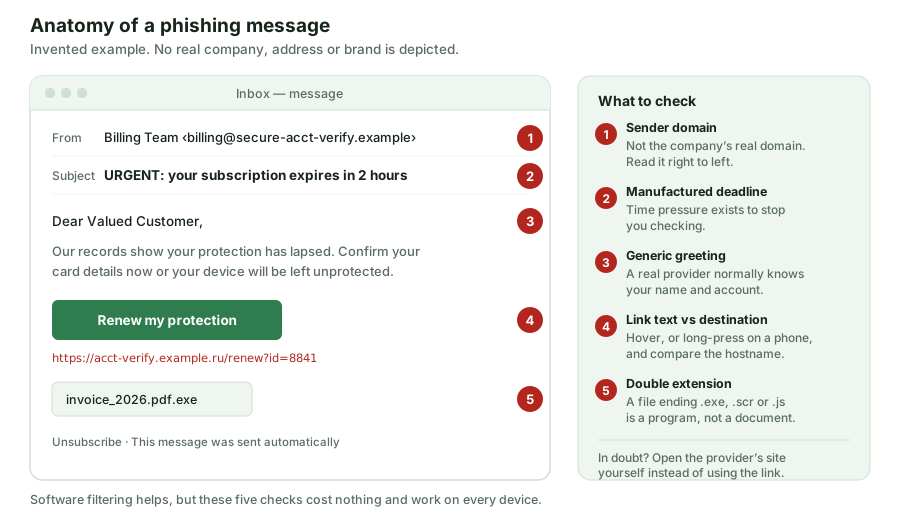
The five checks in that diagram cost nothing and work on any device, with or without a security subscription. The most valuable single habit is the last one: when a message creates urgency, treat the urgency itself as the warning sign, and reach the service by typing its address yourself instead of following the link you were sent.
Five habits that matter as much
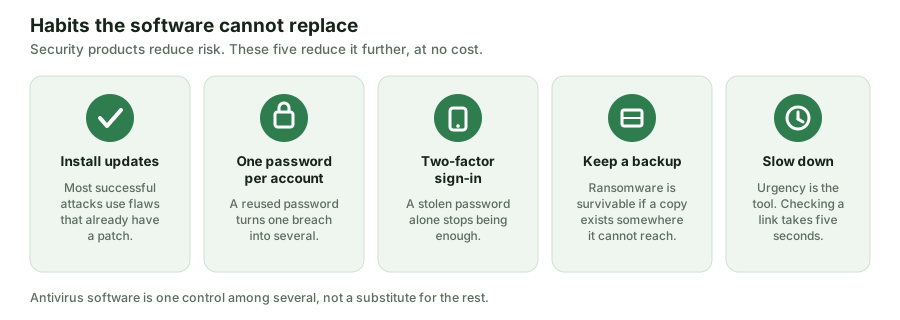
None of these require a purchase. Public guidance from national cyber-security bodies — the UK’s NCSC and the EU agency ENISA among them — consistently puts patching, unique passwords, multi-factor authentication and backups at the top of the list for individuals, ahead of any specific product choice. Security software sits on top of these, not instead of them.
Who it suits, and who should look elsewhere
It is a reasonable fit if…
- you want a single, well-supported product covering one or two machines and do not want to think about it;
- you would use the firewall controls and the password manager, and the small PC backup allowance is a bonus rather than the reason you are buying;
- you value a support channel and a long-established vendor over the lowest possible price.
Look at another tier or another product if…
- you actually want the VPN, dark web monitoring or parental controls — those mean a Norton 360 tier, and buying this one will disappoint you;
- you need to cover a household of devices on several platforms, where the per-device economics of a higher tier are usually better;
- you are comfortable with Microsoft Defender and disciplined about updates, passwords and backups, in which case the marginal benefit is small;
- you need cloud backup as a real backup, in which case buy a backup service and judge it on its own terms.
Before you subscribe: eight checks
- The renewal price. First-term pricing in this market is usually promotional. Find the price the subscription renews at, not the price on the advertisement.
- Automatic renewal. Check whether it is on by default, where the switch is, and what notice you get before a charge.
- The cancellation and refund terms. Read them on the vendor’s site. Note that EU consumers generally have a 14-day right of withdrawal for distance contracts, with specific rules for digital content you have started using — the vendor’s terms set out how this applies.
- Any protection promise. Norton advertises a virus-protection promise; like all such promises it has conditions attached. Read them before treating them as a guarantee.
- Device count and platforms. How many devices, and does the tier cover the operating systems you actually use? Feature parity between Windows and macOS is not complete.
- Which tier the feature you want is in. Confirm it on the vendor’s comparison page, not from an advertisement or from this article.
- What the product sends to the vendor. Cloud-assisted detection means file metadata leaves your machine. The vendor’s privacy notice describes what and why.
- Whether you will keep it. A security product you disable because it nags is worse value than the free one you leave switched on.
Ready to check the current offer?
Open Norton AntiVirus PlusPartner linkPartner link. If you buy after following it, Black Shark s.r.o. may receive a commission from the vendor. You pay no more than you would going direct, and nothing is added to your price. We do not see what you buy; the vendor handles the whole transaction.
Sources
Feature composition and tier boundaries: Gen Digital’s own Norton product and comparison pages at norton.com, consulted while preparing this article. Detection and performance test methodology and results: AV-TEST, AV-Comparatives and SE Labs. General guidance for individuals on patching, passwords, multi-factor authentication, phishing and backups: UK National Cyber Security Centre and ENISA. Microsoft Defender Antivirus documentation: Microsoft Learn.
Descriptions of Norton’s internal components use the vendor’s own published names. We have not independently audited the engine, and we have not run our own detection or performance benchmarks; where this article describes test results it points you to the laboratories rather than restating figures.
Corrections and funding
Funding. This article is funded by affiliate commission. Black Shark s.r.o. may be paid by the vendor if you subscribe after following a partner link. The commission does not depend on what this article concludes, and no advertiser has approval over the text. Full detail: affiliate disclosure and editorial policy.
Corrections. If something here is wrong, write to info@vestrovia.online with the page and the claim. We correct factual errors and date the correction at the foot of the page. Substantive changes are described, not silently edited.
Precedence. Product features, tier names, allowances, prices and contract terms are set by the vendor and change without notice. Where this page and the vendor’s own information diverge, the vendor’s information is correct and this page is out of date.
Published 21 September 2026 by Thomas Cooper for Black Shark s.r.o.. Revision history: first publication. No corrections to date.