Online safety basics: the part that costs nothing
Published 21 September 2026 by Thomas Cooper · Last updated: 21 September 2026
Before deciding whether to buy security software, it is worth knowing which risks software addresses and which it cannot. The measures on this page are free, apply to every device you own, and are consistently ranked above product choice in public guidance for individuals.
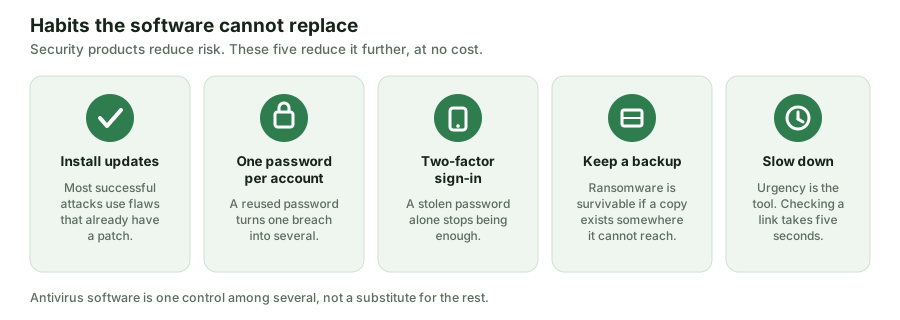
1. Install updates, promptly
A large share of successful attacks use a vulnerability for which a patch already exists. The attacker is not defeating your defences; they are relying on your not having applied a fix that was published weeks or months ago. Turn on automatic updates for your operating system, your browser and anything that opens files from the internet, and restart when asked — a downloaded patch that has not been applied protects nobody.
The same logic applies to devices people forget: phones, tablets, routers and anything in the house with a network connection. When a device stops receiving security updates from its maker, it has quietly become the weakest point on your network.
2. One password per account, kept in a manager
The single most common route into someone’s accounts is not malware. It is a password reused across sites, exposed in a breach of one of them, and then tried against the others by an automated script. This is called credential stuffing, and it works because reuse is common.
The practical fix is a password manager: one strong passphrase you remember, unique generated passwords for everything else. Your browser has one built in, your operating system has one, and several standalone ones are free — including the one bundled with the product reviewed on this site, which is also offered separately at no charge. Which you pick matters far less than using one.
For the few passphrases you must remember, length beats complexity: several unrelated words are both stronger and easier to recall than a short string of substituted characters.
3. Turn on two-factor authentication where it matters
Two-factor authentication means a stolen password alone is not enough. Start with the accounts that can be used to reset the others: your e-mail, then banking, then anything holding payment details or personal documents. Your e-mail account is the master key to most of your digital life and deserves the strongest protection you are willing to maintain.
Not all second factors are equal. An app that generates codes is better than a text message, because SIM swapping is a real attack. A hardware security key is better still and is also the most resistant to phishing, because it will not authenticate to a look-alike domain. Any of the three is a large improvement on none.
4. Keep a backup the running machine cannot reach
Ransomware is survivable if a current copy of your files exists somewhere the infected machine cannot write to. That last clause is what matters: a permanently connected external drive, or a sync folder that mirrors deletions and encryption, may be encrypted along with everything else.
A workable pattern for a household: keep more than one copy, keep at least one of them off the machine, and check once in a while that a file can actually be restored. An untested backup is a belief, not a backup.
5. Slow down when something is urgent
Nearly every successful scam manufactures time pressure, because haste suppresses checking. Treat urgency itself as the warning sign. A genuine provider will not lose your account because you took ten minutes to verify a message, and no legitimate organisation asks for a password or a card number to “confirm” anything.
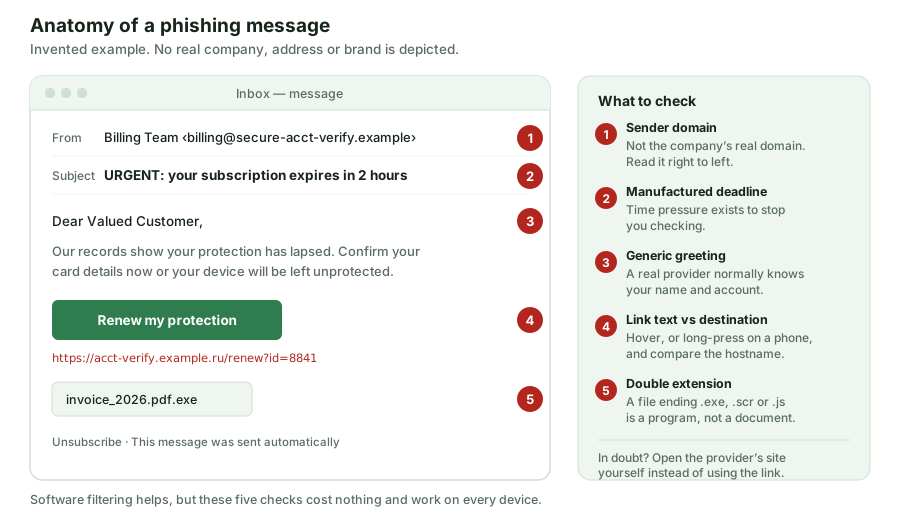
The reliable habit is to reach the service yourself rather than through the message: type the address, or use a bookmark, or open the app. That one substitution defeats nearly every phishing page, because the fake page only works if you arrive through the attacker’s link.
Where security software fits
It sits on top of all of the above, not instead of it. Antivirus software is good at the thing habits cannot cover: recognising hostile code that has reached your machine, sometimes before it runs at all. It is poor at the thing habits do cover, because a person typing a password into a convincing fake page has executed nothing for the software to detect.
If you want to see how that recognition actually works, and how the tiers of one widely advertised product differ, the main guide on this site goes through it in detail: Norton AntiVirus Plus reviewed. It is an advertising-funded page, and it says so at the top.
Sources and further reading
UK National Cyber Security Centre — guidance for individuals and families; ENISA, the European Union Agency for Cybersecurity; AV-Comparatives and AV-TEST for independent product testing. These bodies publish their own guidance and methodology; where our summary and their current advice differ, follow theirs.
This page contains no partner links. It is published by Black Shark s.r.o. and signed by Thomas Cooper; corrections to info@vestrovia.online.